Tag Archives: H5P

Like H5P Community Day Sydney: Better Learning Together by H5P⤴

from @ wwwd – John's World Wide Wall Display

The free event brought the H5P community together for a day of practical examples, product updates, thoughtful discussion and networking. Across the sessions, one message came through clearly: effective digital learning is not about adding more technology. It is about using the right tools with clear learning intentions.

H5P is one of the features of Glow Blogs I’d like to see more of. I used it a lot, in the most simple of ways, in my last couple of years teaching.

H5P Interactive Video Problems with YouTube Videos⤴

from @ Glow Blog Help

There are two problem with some H5P interactive videos.

Both are the result of changes in YouTube behaviour.

1 The videos play but audio only

In this case the content appears but the video can’t be seen.

You can fix this by updating the Interactive Video Module.

This can be a bit complicated, but this method has worked for me

  1. Go to create a new piece of H5P content.
  2. Find the interactive video type and if it says Update Available then click Details and Update.
  3. Go to H5P-> Libraries in the settings.
  4. If there is a message about Rebuilding the cache do that.
  5. Check and see if the video works
  6. If not go back to the Libraries scroll down and find Interactive video, open the information screen and rebuild cache there too.

Those steps have fixed the issue from me on two sites.

On one of my site where I have hundreds of pieces of H5P content the rebuilding took around 20 minutes. I went for a cup of tea!

2 YouTube videos show an error on Safari.

Interactive Video not working – Error 153 | H5P

Even after applying the fix about there may be a problem with any YouTube Videos in the Safari browser. There is currently not a fix for this. But there is a workaround.

  1. Create and embed your content or edit the content. Make sure all the Display Options are ticked.
  2. View a page with the content on it.
  3. Click Embed and copy the code. This embed code will work when added to a post. You can replace the original code.

This will fix problems with any YouTube videos in Safari. It may be worth doing if you are providing H5P video content to learners using macs or iPads.

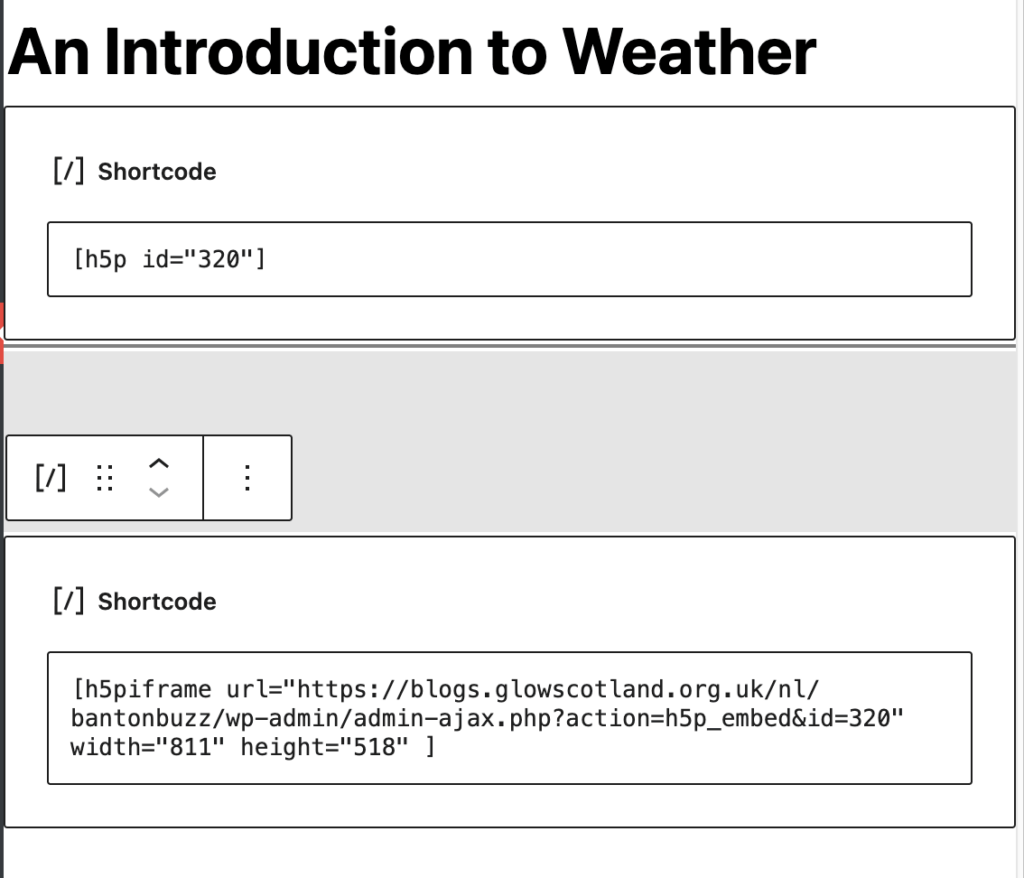
This screenshot show the original embed code and the one copied from the content. Do not use both in the same post.

Screenshot of two shortcode blocks, one with original embed code the other with workaround.

If you are seeing this problem and have trouble fixing it, please get in touch, fill in the form.

Glow Blogs Update May 2025⤴

from @ news – Glow Blog Help

Glow Blogs was updated yesterday.

The Following Plugins were updated. Jetpack, Syntax Highlighter, WP Accessibility, Mega Menu, H5P, Youtube Embed , 3D Flipbook, Userway Accessibility, WP Draw Attention.

The Plugin updates in the main as small fixes and compatibility with the latest version of WordPress.

Jetpack

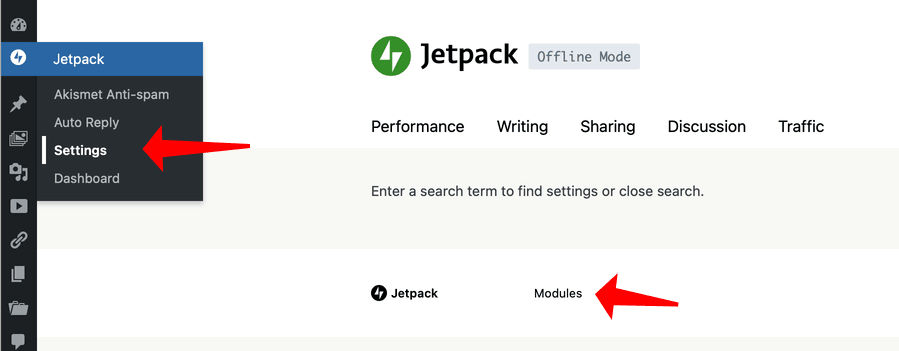
Fixed: A problem with the Jetpack icon not being visitable in the dashboard. Access to turn on and off the jetpack modules has been restored to the dashboard. The interface has changed a little. The Modules have been split into tabbed sections in the Setting screen.

You can access the older simpler interface by using the Modules link in the settings or Dashboard.

H5P

Fixed: Various problems with the H5P plugin. You now can install all of the H5P content types.

You may see a problem with installing some content types. In particular the Games Map, Interactive Video and other large content types. The libraries are large and need other libraries to be installed. You may occasionally see a 503 error but refreshing the page will show the content type installed and ready to use. We would recommend installing the interactive Video content type before adding the Game Map, Branching Scenario or Column types.

H5P Christmas Advent in Glow Blogs⤴

from @ wwwd – John's World Wide Wall Display

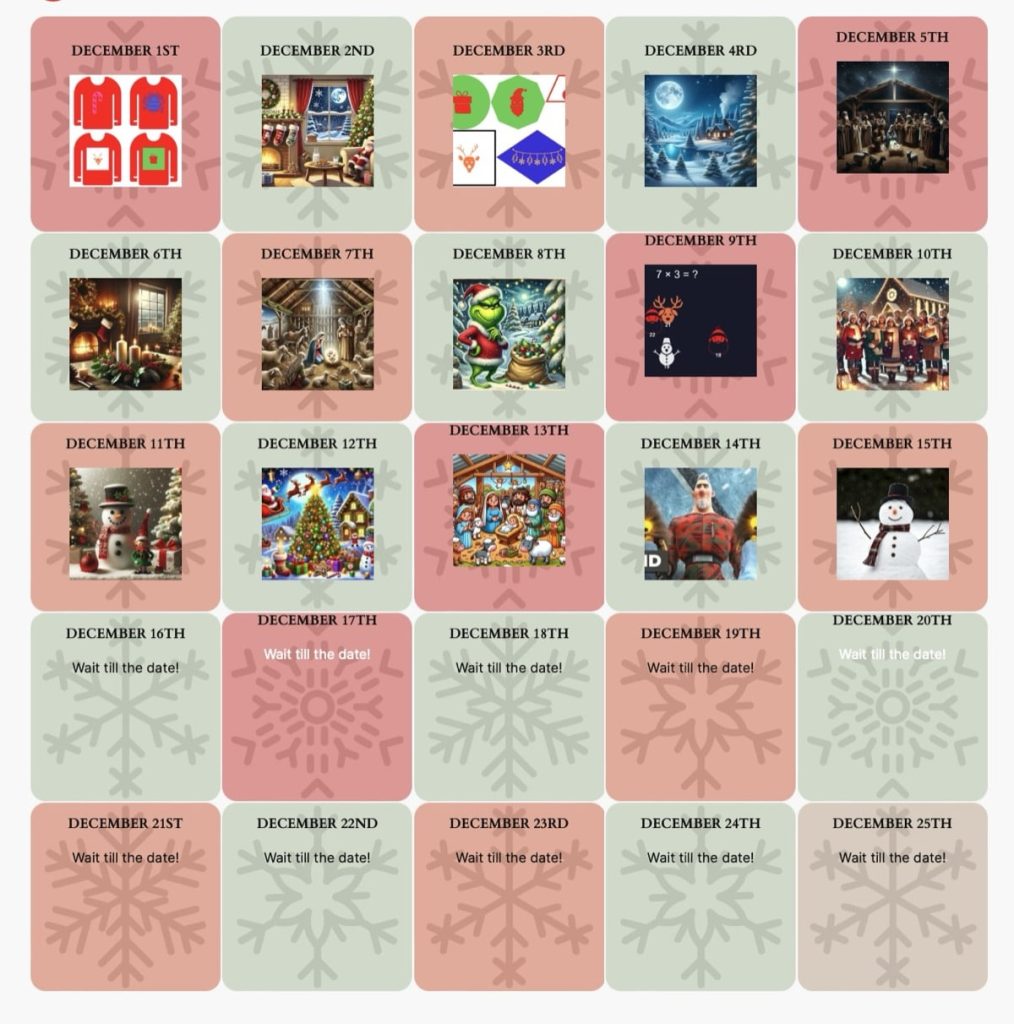
The Advent calendar in Glow Blogs has now 15 wee activities for mid-upper primary. 5 minutes of Christmas fun or a brain break for each day. New ones appear at 1 minute past midnight.

I have learnt a bit about the Site Editor when making the Calendar page. I used the new, to Glow, Grid Block. Each grid contains a group with a display post shortcode. The Display posts plugin allows me to show a thumbnail for the post published on a particular day. If there are no posts it just shows text of my choice. In this case ‘wait for the date’. The posts are queued up by scheduling.

There is an Advent Calendar in H5P itself, but I like the display post approach.

Each post has a simple H5P activity. Matching games, quizzes and the like.The Site Editor in Glow blogs is a really powerful tool for creating different looks. I’ve enjoyed testing the cover block a bit this weekend.

Find the Plovers H5P example in Glow Blogs⤴

from @ wwwd – John's World Wide Wall Display

A small example of the H5P Find Multiple Hotspots content type in Glow Blogs.

I was intrigued how these wee chicks survived given the number of dogs walked along this shore in addition to plenty of gulls & crows who I would expect to enjoy a plover chick dinner. Even the adults are quite hard to spot.

I am building a collection of H5P examples on Glow Blogs. I’ve also been using it to make some spelling crosswords, word-searches and cloze procedures for my class using the North Lanarkshire spelling word list.

ChatGPT for Lazy Teachers⤴

from @ wwwd – John's World Wide Wall Display

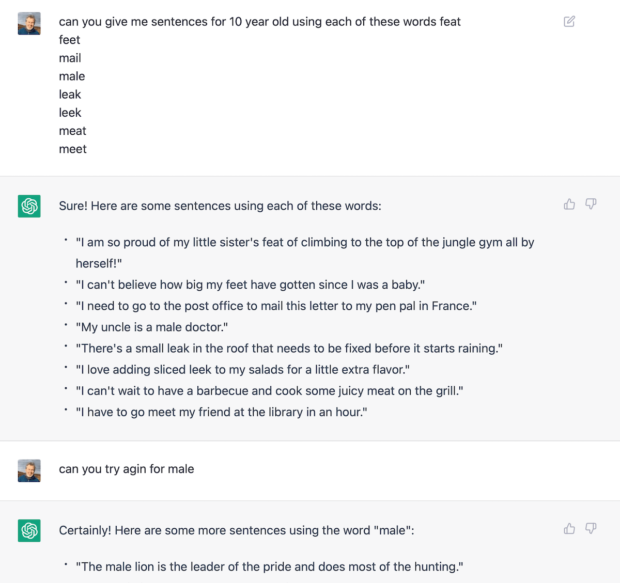
ChatGPT discussion screenshot. Text in blog post.

I’ve read a bit about ChatGPT use in education, there is a lot about 1

I’ve been kicking the tyres of ChatGPT a little. Even on the surface it is quite interesting.

I have tried a couple of things that might be useful. One is to get some JavaScript functions for a little fun. It did what I wanted. The other was perhaps more pertinent to teaching.

I wanted to knock out a couple of simple cloze procedures, making up sentences is one of the more tedious tasks so I though I’d give ChatGPT a shot. I asked:

Me: can you give me sentences for 10 year old using each of these words feat
feet
mail
male
leak
leek
meat
meet

ChatGPT: Sure! Here are some sentences using each of these words:

"I am so proud of my little sister's feat of climbing to the top of the jungle gym all by herself!"
"I can't believe how big my feet have gotten since I was a baby."
"I need to go to the post office to mail this letter to my pen pal in France."
"My uncle is a male doctor."
"There's a small leak in the roof that needs to be fixed before it starts raining."
"I love adding sliced leek to my salads for a little extra flavor."
"I can't wait to have a barbecue and cook some juicy meat on the grill."
"I have to go meet my friend at the library in an hour."

So I needed to fix the spelling of flavor and asked, with typo,  as in the screenshot,  for another sentence for male. I got a list. I needed to adjust the one I chose to make the lion lazy too.

It was easy enough to paste that into an H5P Fill in the Blanks Content and get a cloze in Glow Blogs.

Diversion to Other Geeky Territory

The Fill in the missing blanks content in H5P takes text with the words you want to be blank surrounded by asterisks. Since I’d copied the sentences into a text editor to replace the quotations, I set the document format to markdown, selected the words and pressed ⌘-i.

Markdown Text Edit Italic animation

I then wondered if I could get ChatGPT to add the asterisks for me, so I asked: with an asterisk before and after each word. This it did, but as it typed then it seems that ChatGPT uses markdown, so as it typed the closing astrisk the enclosed word became italic. So back TextMate for me.
H5P interactive content in Glow Blogs⤴

from @ wwwd – John's World Wide Wall Display

Well I am quite excited. There is a new plugin in Glow Blogs, H5P. This is quite different from anything else in blogs.

H5P is a system for creating interactive HTML5 content. It can work inside several types of publishing platforms including WordPress.

The range of content types that you can create with H5P is pretty wide. Some are ways of presenting material, accordions, image galleries. Others are learning activities, quizzes, multi-choice questions, word searches and crosswords. More sophisticated types include interactive video. Videos can be paused by viewers to respond to questions and quizzes and 360 tours. Responses to quizzes, cloze procedures etc are gathered from logged on users.

You can combine these content types , or display them on a blog in different ways.

I’ve spent a bit of time making some simple examples for Glow Blogs which has allowed me to start to think about how best to use these.

I’ve also started to build up a small bank of resources for spelling for my class: igh example. So far I am only scratching the surface.

I’ve always enjoyed making online resources for my classes to use. but these can take a lot of time and can be difficult to make presentable or present. The H5P plug-in solves many of these problems and are made “inside” the blog.
Having them on a blog allows resources to be quite easily organised. The Display Posts plug-in or using the make theme helps. Post listing in Gutenberg will be useful too.

Here are a couple of examples embedded from Glow Blogs.

A 360 tour:

and a fill in the missing words exercise.