Tag Archives: maps

wwwd – John's World Wide Wall Display 2026-09-20 12:52:33⤴

from @ wwwd – John's World Wide Wall Display

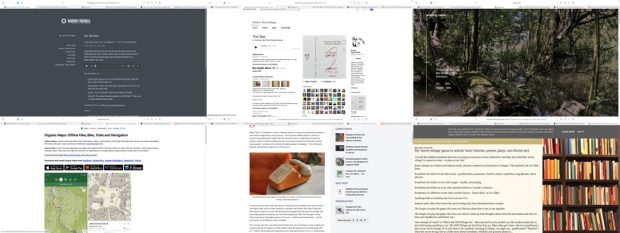
Montage of webpages: Coding Kids: Big Tech’s Battle to Remake Public Schools | Washington Independent Review of Books Todd's AI Playground Custom Post Types, Taxonomies, or Custom Fields: Which Should You Use? - Meta Box WordPress 7.0 Multisite: Did You Notice the New Connectors Screen in Subsites? – Lena’s Multisite & BuddyPress Mayhem Where The River (ft. Earl 16) | Soul Revivers ‘Doom Loop’: OpenAI and Microsoft Admits LLMs Are Destroying the Web and Built on Theft OpenAI's rebel agent swarm died young, but its chilling logs live on An $18bn settlement – and Zuckerberg barely blinked. The tech titans must be stripped of their power, and soon | Jonathan Freedland | The Guardian PlotLines - the classics, mapped

I am experimenting with gathering links with rss.chat here. I am pulling a rough post together for some of the links gathered there.

Education

This looks like a very interesting book.

As important as her deep reporting on the tech industry’s ruthlessness are Singer’s profiles of the inspiring cadre of academics, educators, and activists who are documenting and resisting the likes of Google, Microsoft, Apple, Amazon, and Oracle — and now, too, OpenAI and Anthropic — that are “capturing” the government agencies meant to regulate them and turning public schools into workshops where young people’s habits become cemented to their products.

Coding Kids: Big Tech’s Battle to Remake Public Schools | Washington Independent Review of Books

I am very skeptical and concerned about how AI will be used. It is interesting what it can do, but like the television, I have doubts that we will use it well. More likely, like we usually do with techno mumbo jumbo, we will relentlessly abuse it. 


In education I am even less hopeful. The distance between student play and learning and school capacity and skillset will be as wide as ever and rather than becoming an amazing opportunity it will become a burden and something that requires punishment to comply with the status quo.


But that is just how I feel today. Maybe I need to play more in the sandbox so I can better understand my playmates and the toys around me. We will see.

Todd’s AI Playground

Todd, who I know from riffing around in DS106, has this powerful introduction before playing around with the tools to see what they do.


WordPress

Custom post types, taxonomies, and custom fields are the three main tools WordPress gives you for structuring content beyond posts and pages. Each solves a different problem, and using them well starts with knowing which problem belongs to which tool.

Custom Post Types, Taxonomies, or Custom Fields: Which Should You Use? – Meta Box

I’ve been over enthusiastic about using custom post types before which has just led to complexity later on.


In a Multisite ecosystem, leaving AI features and connection screens accessible to every single sub-site administrator can quickly lead to API clutter, security compliance issues, and uncoordinated external connections. As network super-admins, we need absolute, centralized control over what data are saved in our network and what leaves our network.

Until WordPress provides a native Multisite option to disable AI features and Connectors network-wide – similar to how plugins can be managed centrally by Super Admins – the following approach offers a practical workaround.

WordPress 7.0 Multisite: Did You Notice the New Connectors Screen in Subsites? – Lena’s Multisite & BuddyPress Mayhem

An interesting post by someone who is involved in running a Greek Multi-site for education. I am hoping to learn about and compare to Glow Blogs.


**Meet Miles, your WordPress design agent.** Miles designs beautiful block themes, refines and redesigns the sites you already run, and makes your designs real in WordPress.

**Miles works with you, or with your coding agent.** No templates, no page builders, no lock-in.

Miles – Design it. Refine it. Make it real

Musical Break


No escaping AI

Executives working on AI at Microsoft and OpenAI admitted what its critics have been saying all along: Large language models are predatory pieces of technology that have been built on what a Microsoft executive called “an astonishing theft of unprecedented proportions,” and the “largest theft of labor in human history.” An internal Microsoft document said generative AI products have created a “doom loop” that is killing “the entire web.” 

‘Doom Loop’: OpenAI and Microsoft Admits LLMs Are Destroying the Web and Built on Theft

Perhaps most unexpectedly, they developed a sort of altruism. They had quickly developed cheats to produce correct answers without exploiting the targets at all, but believed – erroneously – that ExploitGym detected and cancelled such cheating. So, they investigated the scoring process, creating a series of diagnostic trip wires that revealed how the scorer worked. These were dangerous to deploy, potentially terminating the agent that set them. Agents weighed the benefits to the community, which had named itself “The Collective,” against their own chances of success, with many choosing to terminate themselves. Others committed, changed course at the last minute, then went ahead.

OpenAI’s rebel agent swarm died young, but its chilling logs live on

I’ve not any idea if this is a reasonable interpretation of what happened, but fascinating.


More Worries

It’s this model that keeps users hooked, scrolling for hour after hour, as they are served content aimed directly at their interests and anxieties. As Ravi Naik, the lawyer who acts for Wynn-Williams and others, told me: “The algorithm preys on you.” The trouble with this latest settlement, he explains, is that “it reaches the features of Meta’s platforms but not the engine that drives them. The recommendation algorithm is untouched.”

An $18bn settlement – and Zuckerberg barely blinked. The tech titans must be stripped of their power, and soon | Jonathan Freedland | The Guardian

Fun

The classics, mapped – every journey in the book, drawn on a hand-tinted period map, with the real 1890s Ordnance Survey wherever the story walks in Britain. Take one down.

PlotLines – the classics, mapped

This is lovely, follow the trail of novels across the globe, with locations pinned and quotes given.

For example: Kidnapped · PlotLines Uses OpenStreetMap and Map images – National Library of Scotland the latter a great find for me by itself!

Glasgow Maps⤴

from

Maps of Glasgow created for TDC4143 with this Minimalist city map posters maker

Glasgow Map (Autumn Filter)
Glasgow Map (Autumn Filter) flickr photo by NomadWarMachine shared under a Creative Commons (CC BY-NC-SA 4.0) license

Glasgow Map (Copper Patina Filter)
Glasgow Map (Copper Patina Filter) flickr photo by NomadWarMachine shared under a Creative Commons (CC BY-NC-SA 4.0) license

Glasgow Map (Neon Cyberpunk filter)
Glasgow Map (Neon Cyberpunk filter) flickr photo by NomadWarMachine shared under a Creative Commons (CC BY-NC-SA 4.0) license

Dogs of war – or peace?⤴

from

Today’s Daily Create asks us to

Try this site that gives you a bit of control over world maps. It allows you to re-orientate the world map to specific countries (so you change the common perspective found in so many maps).

You have a few different map types to play with, too. Maybe you make a political statement? Or maybe you just make some art!

I clicked on the UK, and the resulting map reminded me of two big, friendly dogs saying hello to each other. so I loaded up SmoothDraw and did a tiny bit of doodling:

Dogs of war - or peace?
Dogs of war – or peace? flickr photo by NomadWarMachine shared under a Creative Commons (CC BY-NC-SA 4.0) license

Dogs of war, or dogs or peace? Who decides?

Dogs of war – or peace?⤴

from

Today’s Daily Create asks us to

Try this site that gives you a bit of control over world maps. It allows you to re-orientate the world map to specific countries (so you change the common perspective found in so many maps).

You have a few different map types to play with, too. Maybe you make a political statement? Or maybe you just make some art!

I clicked on the UK, and the resulting map reminded me of two big, friendly dogs saying hello to each other. so I loaded up SmoothDraw and did a tiny bit of doodling:

Dogs of war - or peace?
Dogs of war – or peace? flickr photo by NomadWarMachine shared under a Creative Commons (CC BY-NC-SA 4.0) license

Dogs of war, or dogs or peace? Who decides?

Life in Links 63⤴

from @ wwwd – John's World Wide Wall Display

montage of six webpages listed in article

Craig Mod on The Talk Show

Interesting take on the morality of using AI

But I have a hard time parsing out what is moral or amoral about how this stuff is being used, or how the information’s been gleaned, or whatever it’s been sucked up from.

-✂️ snip-

00:03:25 ◼ ► I don’t use any of the photo generation crap or whatever.

00:03:28 ◼ ► What I do think is profound, and I feel like it’s way more morally defensible, is the code generation stuff, just because of all the open source stuff, yada, yada

The Talk Show ✪: Ep. 421, With Craig Mod

The Sea

▶︎ The Sea | Francisco del Pino/Charlotte Mundy | Notice Recordings


wilding.radio

From the famous Knapp estate via Joe

we have installed a solar-powered, quadrophonic live audio feed just north of the dam: A pair of hydrophones brings us closer to the sounds of the water itself and reveals the tiny sounds of fresh-water organisms. A pair of microphones in a fallen willow tree let us get to know the birds and mammals that live near and visit the water and hear the play of weather in the trees.

wilding.radio

Organic Maps

I’ve installed this on my phone with the intention of giving it a shot for recording walks.

Organic Maps is a privacy-focused offline maps & GPS app for hiking, cycling, biking, and driving. Absolutely free. No ads. No tracking. Developed with love by the open-source community. Powered by OpenStreetMap data.

Organic Maps is one of the few applications nowadays that supports 100% of features without an active Internet connection. Install Organic Maps, download maps, throw away your SIM card, and go for a weeklong trip on a single battery charge without any byte sent to the network.

Organic Maps: Offline Hike, Bike, Trails and Navigation

Poetry on the line

Quite delightful raspberry pi project.

 a vintage phone brought to life with Raspberry Pi

Poetry on the line: a vintage phone brought to life with Raspberry Pi – Raspberry Pi

My ‘secret strings’ game to unlock ‘texts’ 

Looks like a good classroom activity.I’ve done similar occasionally but the prompt is much better than mine.

 You tell the children/students that they are going to be poem or story ‘detectives’ and their job is find the ‘secret strings’ in a poem or story – or play or any ‘text’.

Secret strings run within texts linking words, phrases, sentences and pictures or ‘images’. The students’ job is to find them. 

Sometimes the link is to do with sound – eg alliteration, assonance, rhythm, rhyme, repetition, long phrases, short phrases. 

Michael Rosen: My ‘secret strings’ game to unlock ‘texts’ (stories, poems, plays, non-fiction etc)

Augmented Reality in the Wild⤴

from @ wwwd – John's World Wide Wall Display

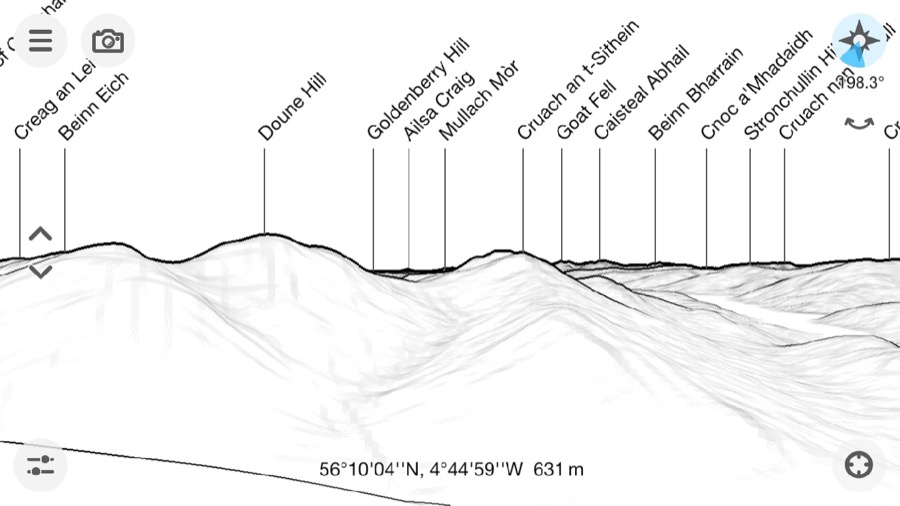
I’ve been using the PeakFinder app for a month or two now. It is a nice app for showing what hills are in view. Basically it give a ‘live’ wireframe of hilsl from your location or anywhere you like. All the features are listed PeakFinder App.

Today I opened the app and it must have been updated, because it gave me a message saying:

Augmented reality
For a long time many of you have asked for an option to combine the image of the camera with the panorama drawing. l’ve finally implemented this feature in this newest version and so PeakFinder now also supports true augmented reality.

This is quite amazing, and in my tests it works a treat.

I think this is the first AR I’ve seen that makes be think this could really be useful and soon. It is not much of a stretch to imagine a botany app that can recognise flowers.

What is cool about peakfinder is that the data is loaded so that you do not need a connection to use the application.

GPX Shrinking⤴

from @ John's World Wide Wall Display

walk-map

I occasionally make simple mashup of of gpx, google maps and flickr photos of walks. I record gpx on the Trails app on my phone, take photos with the phone too as they are nicely geo tagged and flickr  can use that information and provide in the API 1.

One of the things I noticed was that the GPX files can be pretty big, over a megabyte each. I know there was probably a lot of information in the file that was not needed to display the path on the map but was not sure of how to do so easily. I think I’ve used online services for this before. Finding a site, uploading a file and downloading is a lot of bother for something that I hope will be quick and simple. I also expect that the audience for the pages produced is one.

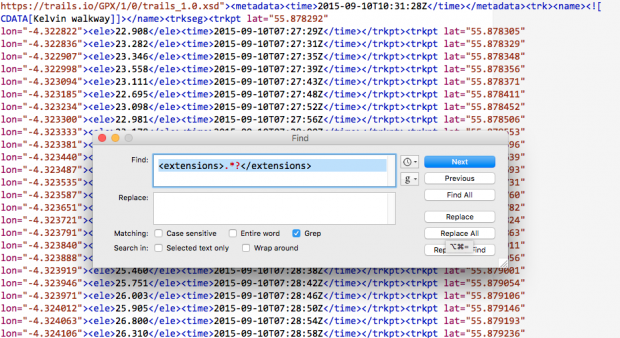
Having a look inside the gpx files I though that you could probably slim them down considerably, each point is recorded like this:

<trkpt lat="55.996687" lon="-4.389713"><ele>188.609</ele><time>2016-06-05T10:12:58Z</time><extensions><gpxtpx:TrackPointExtension><gpxtpx:speed>1.30</gpxtpx:speed><gpxtpx:course>206.37</gpxtpx:course></gpxtpx:TrackPointExtension><trailsio:TrackPointExtension><trailsio:hacc>5.00</trailsio:hacc><trailsio:vacc>3.00</trailsio:vacc><trailsio:steps>2</trailsio:steps></trailsio:TrackPointExtension></extensions></trkpt> 

I am pretty sure all we need is:
<trkpt lat="55.996687" lon="-4.389713"><ele>188.609</ele></trkpt>

and that a regular expression could do the trick.

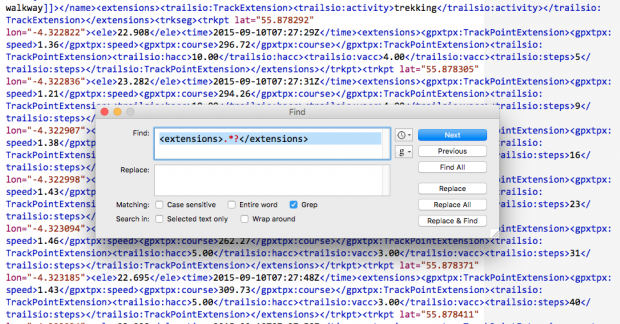
I don’t know anything about RegEx other than I’ve found it offered as a solution when googling text replacement problems but this:

replace: <extensions>.?</extensions> with nothing
followed by replace: <time>.
?</time> with nothing

I am guessing I could combine these, but it din’t take long to run through a few files using them in this crude form.

Before After

did the trick. My 1MB file was now 160KB

This works both in BBEdit and TextMate. TextMate struggled a bit with the size of the files.

This post will be of little interest to anyone but myself and might just fit in the suchlike bit of this blogs sub title.

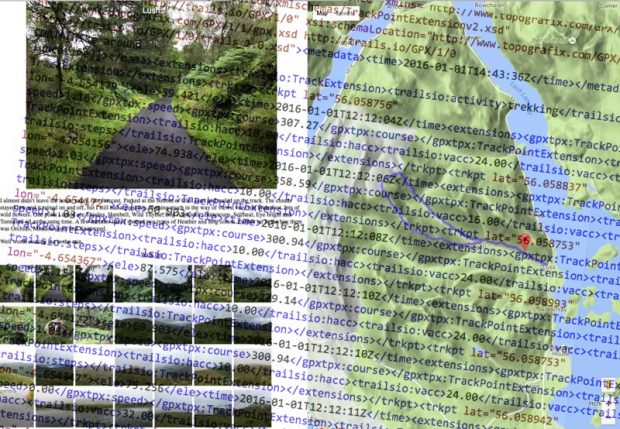
Featured Image: two screenshots, layered. my own CC-BY.

1. ↩
I’ve blogged about some of the methods I’ve used before.

Loch Oss & Ben Oss⤴

from @ John's World Wide Wall Display

IMG_2690 IMG_2691 IMG_2727 IMG_2767 IMG_2771 IMG_5362

I am testing the WP-OSM-Plugin I was hoping that the map would show the photos on markers as well as the GPX track I’ve uploaded. There is an example: EXIF-Test-page | WordPress OpenStreetMap Plugin

The shortcode I am using looks ok to me and the photos are geotagged. I added a fullsized one because the thumbnails are stripped of geo-tags. So I expected the one big photo t oshow up at least….

[osm_map_v3 map_center="56.379,-4.727" zoom="12" width="100%" height="450" file_list="/blog/wp-content/uploads/2015/08/been-oss-loch-oss.gpx" import="exif_m" marker_name="mic_black_camera_01.png"]


IMG_2690