Tag Archives: enviable stuff

Life in Links 48⤴

from @ wwwd – John's World Wide Wall Display

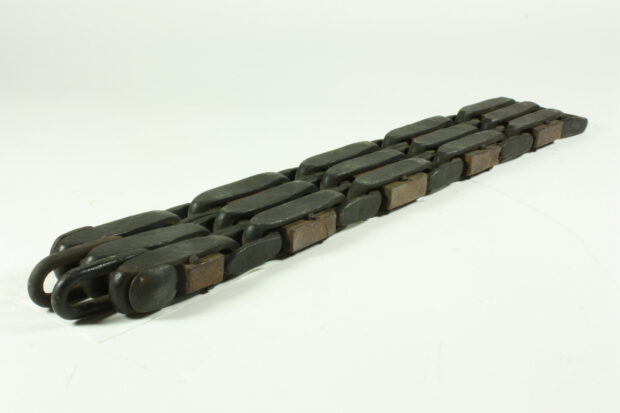
Winding Chain - Triple Square Link with Wooden Spacers, 5½-inch Pitch, Wrought Iron, 1850s-1870s

I’ve not posted links for a while, these are some of the things I’ve found interesting in the last couple of weeks.

Technology

Education

Sounds

Nature

Featured image found with Openverse, attribution copied from the caption. Winding Chain – Triple Square Link with Wooden Spacers, 5½-inch Pitch, Wrought Iron, 1850s-1870s by Photographer: David Thompson is licensed under CC-BY 4.0

Links for Glow Blogs⤴

from @ wwwd – John's World Wide Wall Display

A couple of links for the future of Glow Blogs & one that is useful now (go Gutenburg).

Block theme generator – Full Site Editing

Submit the form to create a .zip file with your own WordPress starter theme for full site editing.

Part of WordPress full site editing and themes – Full Site Editing

Full site editing is a set of new WordPress features that helps us edit all parts of our website: Block themes, template editing, site blocks, and global styles.

Go Gutenberg – Learn the New WordPress Editor

Find Your Way Around Gutenberg introduces a brand new writing experience for your WordPress-powered site.

We’ll show you how to navigate the new interface and save time while editing.

Escape Rooms⤴

from @ wwwd – John's World Wide Wall Display

Saving this here for following up after the summer break.

The concept had passed me by somehow until Mr Dorman from the @PedagogyTeamNLC introduced them to my class, which very much enjoyed by the children. I had planned on thinking about this a bit more, but other things happened.

Today Arron’s bookmark reminded me and took me to Librarians turned Google Forms into the unlikely platform for virtual escape rooms which links to this example: Hogwarts Digital Escape Room.

I’ve seem a few examples using OneNote and google forms before but this is probably the smoothest experience.

I had wondered if using password protected WordPress posts or pages would work.

I even make a simple set up Make an Escape which produces a sort of digital multi lock (all the answers are 123) before lockdown.

Today I started doing a little reading following Arron’s links, Breakout EDU Additional Game Creator Lab Resources – bit.ly/boeduresources – Google Slides looks as if it is worth borrowing from.

2019 in Review: Blog Reading⤴

from @ wwwd – John's World Wide Wall Display

I’ve often made an end of year posts reviewing my blogging. I though this year I might review my blog reading. These are a few of the sites I’ve enjoyed. The blogs I try not to miss and some I would love to be able to emulate.

Cogdog blog. Alan’s blog has been a constant in my life for years. Discussing sharing, sharing WordPress code and more wrapped in a real life with a real voice. I follow Alan wherever he roams.

Read Write Collect is my main education hosepipe filter. Aaron reads and comments on a huge range of educational and web tech blogs wrapped in a tasty IndieWeb coating.

I spend more time on the gentle, eclectic Micro.blog community/aggregator than social networks nowadays. @smokey is a one man community engine nearly every week he produces a post with a list of posts and pictures he has picked out. A few of us tried this for a while, as far as I know @smokey is the only one to have kept it up.

I love Tom Woodward’s Weekly Web Harvest which I think might be auto generated from pinboard. The rest of the blog certainly isn’t auto generated but is a must read too.

Scripting News

Tom Smith, I follow across twitter, Instagram and now his blog. Creative Chaos.

ScotEduBlogs, an aggregation of Scottish Educational bloggers. I run this as a gift to the community, but also because it means it is easy to read great stuff from across Scottish education at all levels.

I read a lot more via RSS. My twitter browsing has decreased but I have a couple of private lists one called regular & one for primary classroom folk.

I continue to find some really good resources on twitter. I do wish more of the teachers sharing would use a blog. (much easier to keep track of, organise etc). If they are in Scotland they could join in ScotEduBlogs too.

Featured image from Image from page 285 of “Studies in reading; teacher’s manual” (1919) on flickr no known copyright restrictions.

wwwd – John's World Wide Wall Display 2019-03-09 07:34:57⤴

from @ wwwd – John's World Wide Wall Display

Watched A meditation on the open web from youtube.com

Created by Automattic and linked to by @manton who says:

I love this video from WordPress. Very similar in style to what I always imagined we could do for Micro.blog.

A hit of space to light out for the Territory at the end too.

Liked: Inter-disciplinary curriculum: why is it so difficult to develop? (part one)⤴

from @ wwwd – John's World Wide Wall Display

Liked Inter-disciplinary curriculum: why is it so difficult to develop? (part one) (Professor Mark Priestley)
These attempts to introduce IDL, and the national guidance that prompted them, have tended to be characterised by a lack of conceptual clarity about inter-disciplinary approaches, leading in many cases to activities that were not really inter-disciplinary, at best being cross-curricular. Public discourse around IDL uses many different terms interchangeably – for example, cross-curricular, integrated, thematic – which are conceptually distinctive but regularly conflated.

Looking forward to the next post:

which will follow in a few days, will explore what needs to be addressed if IDL is to become a practical reality in Scottish schools.

♥︎ Like: Must Do Better⤴

from @ wwwd – John's World Wide Wall Display

Liked Must Do Better (Just Trying to be Better Than Yesterday)
...There are loads of issues linked to the poverty gap, health and well-being issues and attainment, but I’m not convinced that school is always the place to solve them...

I am not convince either. Kenny has, as usual, a lot more intelligent things to say on the matter. A good end of year read.

Kenny goes on:

And we need to find a balance between thinking that Scottish Education is going to hell in a handcart and those who refuse to acknowledge that and believe that all is a shiny brochure and a Twitter feed.


iPad Photo Management: Multi Delete⤴

from @ wwwd – John's World Wide Wall Display


Daring Fireball: Sometimes It’s Better to Just Start Over With iCloud Photo Library Syncing

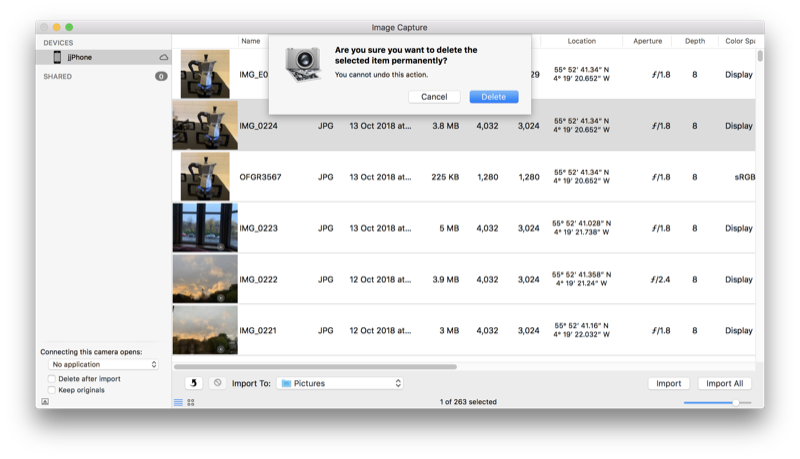
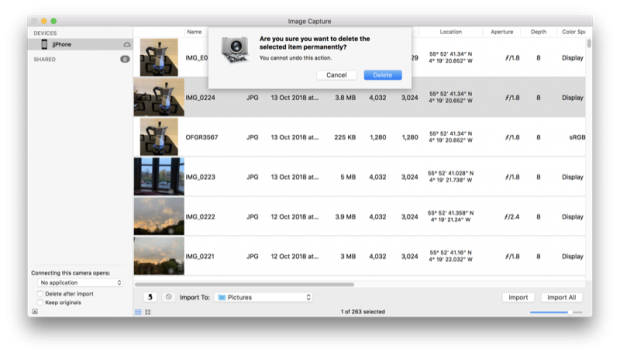
Next, I wanted to delete every single photo and video from my iPhone. To my knowledge there is no easy way to do this on the iPhone itself. (There are a lot of tasks like this that are easy on the Mac thanks to Edit → Select All that are painfully tedious on iOS.) I connected the iPhone to my Mac with a Lightning cable and used Image Capture to delete all photos and videos from my phone. Image Capture just treats the iPhone like a regular camera. Image Capture crashed three times during this process (I’m still running MacOS High Sierra 10.13.6, for what it’s worth), but after the fourth run the iPhone had no photos or videos lefp.

I just deleted all the photos from a school iPad yesterday by selecting a couple and the dragging to select the rest. Worked with ~3000 photos but a bit clunky. I’ll use Image Capture in future. It’s an application I don’t remember very often.

In a 1-2-1 iPad class I do get a lot of benefit from having a mac in school. There a several things that can be solved with a quick airdrop to the mac and back. Given the iPads and mac are of similar vintage (2012).

I’ll edit a note on the mac, it syncs to the iPad (instantaneously it feels like) and I can Airdrop to class or group via classroom app. Now the Classroom app is available for the mac I need to think about upgrading the ageing mac to Mojave. I think it is new enough but spinning hard disk and skimpy ram might be a problem?

Life in Links: you are never on holiday edition⤴

from @ wwwd – John's World Wide Wall Display

I’ve been on holiday for the last two weeks, the second spent unwell with a sinus infection that made me uninterested in everything bar Lemsip and a bit of netflix.

Feeling a bit better and reviewing my pinboard links. Most seem to be around poetry, maths and micro:bits in the classroom ( I need to get out more).

Header image created with above mentioned Sketch Machine.

A Saturday in Tabs⤴

from @ wwwd – John's World Wide Wall Display

The tabs left open from yesterday. The internet is a more fascinating place that I’ve got time for.

Worth mentioning that a lot of these links are coming from micro.blog as well as my RSS reader.