There is a lot of it about, a lot of find out about. short term I don’t think this will have any effect on Glow Blogs, long term who know. Here are some things I’ve been reading.
… update your pages and respond to comments from a desktop app?
…manage all your WordPress blogs and sites in one spot, on any device?
… spend less time on administration and uploading and more time creating?
With core WordPress on the server and Calypso as a client I think we have a good chance to bring another 25% of the web onto open source, making the web a more open place, and people’s lives more free.
You could for example write a Calypso-like front end for your website (Calypso is an admin interface) and that’d mean that a user visiting your website would never see a PHP-powered page. WordPress would just be silently chugging along in the background handling the REST API requests and storing all of your data.
But this is also a rebuttal to anyone who thinks that everything should sit on your own server. With this change, WordPress is now, at least in part, a centralized service – albeit one where you get to choose where your data is stored.
It’s the opposite of the classical content management service model, where the data is managed by a central server, and the interfaces sit wherever you want. It takes a bit to wrap your mind around.
Here are my slides as pdf and shared on iCloud (I’ve never used iCloud in this way). The slides are pretty minimal. There should be video of my talk posted at some point.
It was an interesting day altogether, the worst thing about it was there were two sessions at a time so I missed half of it!
A mixture of WordPress developers and designers for the most part, a different audience for me. Of course I came away knowing how I could have made the presentation a bit better…
I also came away with a bunch of links, and ideas to think about. As usual meeting folk from a different zone there were a lot of good things that could be taken into education, as usual it takes me a few days to start making these connections in my head.
The Edinburgh WordPress group have monthly meetups . Iif they had not been on Wednesdays, when I’ve had Edutalk commitments, I would have loved to get along to while I’ve been working in Edinburgh.
This post is just a quick note to log a problem and its solution. It only took a wee bit of googling but might help me or someone else at a later date. It only applies to self hosted WordPress blogs.
This evening I tried to log on to my blog only to be met with a blank screen. I tried my DS106 blog and that was fine so it didn’t look like the first google suggestion about php being out of memory. Next suggestion was .htaccess corruptions, so I opened fetch and had a look at the file, looked pretty much the same as I recall (note, keep better backups).
The third google suggestion pointed to plugins and suggested solutions 1. This is what I did:
Using using my ftp application (cyberduck) I edited the wp-config.php file. Changing:
define('WP_DEBUG', false); to true
Trying to load the page showed an error mentioning the medium plugin that had been updated earlier in the day. So I changed the name of the plugin folder (still in cyberduck) to medium-broken. This allowed me to log in. Checking the plugin page showed that there was another update for the plugin, crossing my fingers I updated and all was well, the renamed folder was removed and a new folder was in place.
The talk will give a view of how blogging with WordPress fits well with Scottish education’s ‘Curriculum for excellence’. Some loose linkage of Community, Connections & Openness in software and education. How Glow blogs, a set of 32 multi-sites with a total of >160,000 blogs are used and are developing. Some notes of the ‘Product Owner’ role and working at large scale to fit the needs of stake holders from a wide range of ages and needs.
I’ve read a lot of interesting things on Medium over the last couple of years. It seemed to start as an online space to write longer-than tweet posts, and evolved.
I’ve never written more than a few comments and one test post on Medium before this. I’ve been excited about blogging in a Domain of One’s Own and the ideas around that and those coming from the IndieWeb. A lot of the IndieWeb technology goes a wee bit over my head but I’ve installed a bunch of plugins here and thing about it a bit.
One of the IndieWeb ideas is POSSE Publish (on your) Own Site, Syndicate Elsewhere. This site auto posts links to twitter and G+ as do many blogs. I can now send posts to Medium too.
Medium now have an API and there is a Medium/WordPress plugin which allows you to push blog posts to Medium. There are also Medium IFTTT recipes that will do the same thing from other blogging systems. I’ve installed the plugin here.
I don’t suppose I’ll send posts to Medium often, it seems a little too writerly for me, but it is fun to play with and think about a further extension of blogging.
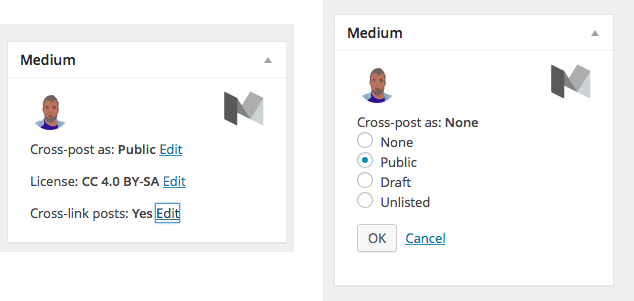
The WordPress plugin attaches the Medium account to your profile, so if you have more than one person posting to a blog they all could posse to different medium accounts. There are settings for copyright and for posting links to the posts in different spaces. The API does not allow you, as of now, to update posts on Medium from your blog. There is a Meta Box on the WordPress post editor to set the status of Medium posts as you go.
Technical note: I had a bit of trouble getting plugin to work as it uses php short echo tags and I had to do a bit of find-and-replace in the plugin files. I am not sure if that will effect many folk.
I read about this first not in medium but my RSS reader, followed through to these interesting links:
For the work we’ve been doing on semantic description of courses we needed a platform for creating and editing instance data flexibly and easily. We looked at callimachus and Semantic MediaWiki; in the end we went with the latter because of JAVA version incompatibility problems with the other, but it has been a bit of a struggle. I’ve used WordPress for publishing information about resources on a couple of projects, for Cetis publications and for learning resources, and have been very happy with it. WordPress handles the general task of publishing stuff on the web really well, it is easily extensible through plugins and themes, I have nearly always found plugins that allow me to do what I want and themes that with a little customization allow me to present the information how I want. As a piece of open source software it is used on a massive scale (about a quarter of all web domains use it) and has the development effort and user support to match. For the previous projects my approach was to have a post for each resource I wanted to describe and to set the title, publication date and author to be those for the resource, I used the main body of the post for a description and used tags and categories for classification, e.g. by topic or resource type; other metadata could be added using WordPress’s Custom Fields, more or less as free text name-value pairs. While I had modified themes so that the semantics of some of this information was marked up with microdata or RDFa embedded in the HTML, I was aware that WordPress allowed for more than I was doing.
The possibility of using WordPress for creating and publishing semantic data hinges on two capabilities that I hadn’t used before: firstly the ability to create custom post types so that for each resource type there can be a corresponding post type; secondly the ability to create custom metadata fields that go beyond free text. I used these in conjunction with a theme which is a child theme of the current default, TwentyFifteen, which sets up the required custom types and displays them. Because I am familiar with it and it is quite general purpose, I chose the schema.org ontology to implement, but I think the ideas in this post would be applicable to any RDF vocabulary. When creating examples I had in mind a dataset describing the books that I own and the authors I am interested in.
I started by using a plugin, Custom Post Type UI, to create the post types I wanted but eventually was doing enough in php as a theme extensions (see below) that it made sense just to add a function to create the the post types. This drops the dependency on the plugin (though it’s a good one) and means the theme works from the outset without requiring custom types to be set up manually.
The key call here is to the WP function register_post_type() which is used to create a post type with the same name as the schema.org resource type / class; so I have one of these for each of the schema.org types I use (so far Thing, CreativeWork, Book and Person). This is hooked into the WordPress init process so it is done by the time you need those post types.
I do use a plugin to help create the custom metadata fields for every property except the name property (for which I use the title of the post). Meta Box extends the WordPress API with some functions that make creating metadata fields in php much easier. These metadata fields can be tailored for particular data types, e.g. text, dates, numbers, urls and, crucially, links to other posts. That last one gives you what you need for to create relationships between the resources you describe in WordPress, which can expressed as triples. Several of these custom fields can be grouped together into a “meta box” and attached as a group to specific post types so that they are displayed when editing posts of those types. Here’s what declaring a custom metadata field for the author relationship between a CreativeWork and a Person looks like with MetaBox (for simplicity I’ve omitted the code I have for declaring the other properties of a Creative Work and some of the optional parameters). I’m using the author property as an example because a repeatable link to another resource is about as complicated a property as you get.
function semwp_register_creativework_meta_boxes( $meta_boxes )
{
    $prefix = 'semwp_creativework_';

    // 1st meta box
    $meta_boxes[] = array(
        'id'         => 'main_creativework_info',
        'title'      => __( 'Main properties of a schema.org Creative Work', 'semwp_creativework_' ),
        // attach this box to the following post types
        'post_types' => array('creativework', 'book' ),

	// List of meta fields
	'fields'     => array(
            // Author
            // Link to posts of type Person.
            array(
                'name'        => __( 'Author (person)', 'semwp_creativework_' ),
                'id'          => "{$prefix}authors",
                'type'        => 'post',
                'post_type'   => 'person',
                'placeholder' => __( 'Select an Item', 'semwp_creativework_' ),
            // set clone to true for repeatable fields
            'clone' => true
            ),
        ),
    );
    return $meta_boxes;
}
What this gives when editing a post of type book is this:
WordPress uses a series of nested templates to display content, which are defined in the theme and can either be specific to a post type or generic, the generic ones being used as a fall back if a more specific one does not exist. As I mentioned I use a child theme of TwentyFifteen which means that I only have to include those files that I change from the parent. To display the main content of posts of type book I need a file called content-book.php (the rest of the page is common to all types of post), which looks like this
attribute. Exposing semantic data as RDFa is one (good) thing, but what about other formats? A useful web service called RDF Translator helps here. It has an API which allowed me to put a link at the foot of each resource page to the semantic data from that page in formats such as RDF/XML, N3 and JSON-LD; it’s quite not what you would want for fully fledged semantic data publishing but it does show the different views of the data that can be extracted from what is published.
Also note that most of the content is printed through calls to php functions that I defined for each property, semwp_print_creativework_author() looks like this (again a repeatable link to another resource is about as complex as it gets:
function semwp_print_alink($id) {
     if (get_the_title($id))       //it's a object with a title
     {
         echo sprintf('<a property="url" href="%s"><span property="name">%s</span></a>', esc_url(get_permalink($id)), get_the_title($id) );
     }
     else                          //treat it as a url
     {
         echo sprintf('<a href="%s">%s</a>', esc_url($id), $id );
     }
}
function semwp_print_creativework_author()
{
    if ( rwmb_meta( 'semwp_creativework_authors' ) )
    {
	echo '

By: ';
	$authors = rwmb_meta( 'semwp_creativework_authors' );
        foreach ( $authors as $author )
        {
               echo '<span property="author" typeof="Person">';
               semwp_print_alink($author);
               echo '</span>';
        }
        echo '

';
    }
}
So in summary, for each resource type I have two files of php/html code: one which sets up a custom post type, custom metadata fields for the properties of that type (and any other types which inherit them) and includes some functions that facilitate the output of instance data as HTML with RDFa; and another file which is the WordPress template for presenting that data. Apart from a few generally useful functions related to output as HTML and modifications to other theme files (mostly to remove embedded data which I found distracting) that’s all that is required.
The result looks like this:
Note, this image is linked to the page on my WordPress install that it shows, click on it if you want to explore the little data that there is there, but please do be aware that it is a development site which won’t always be working properly.
And here’s the N3 rendering of the data in that page as converted by RDF Translator:
There’s a ton of other stuff that I can think of that could be done with this, from the simple, e.g. extend the range of types supported, to the challenging, e.g. exploring ways of importing data or facilitating / automating the creation of new post types from known ontologies, output in other formats, providing a SPARQL end point &c &c… Also, I suspect that much of what I have implemented in a theme would be better done as a plugin.
There is one big problem that I only vaguely see a way around, and that is illustrated above in the screenshot of the editing interface for the ‘about’ property. The schema.org/about property has an expected type of schema.org/Thing; schema.org types are hierarchical, which means the value for about can be a Thing or any subtype of Thing (which is to say of any type). This sort of thing isn’t unique to schema.org. However, the MetaBox plugin I use will only allow links to be made to posts of one specific type, and I suspect that reflects something about how WordPress organises posts of different custom types. I don’t think there is any way of asking it to show posts from a range of different types and I don’t think there is any way of saying that posts of type person are also of type thing and so on. In practice this means that at the moment I can only enter data that shows books as being about unspecific Things; I cannot, for example, say that a biography is a book about a Person. I can only see clunky ways around this.
[Aside: the big consumers of schema data (Google, Bing, Yahoo, Yandex) will also permit text values for most properties and try to make what sense of it they can, so you could say that for any property either a string literal or a link to another resource should be permitted. This, I think, is a peculiarity of schema.org. The screenshot above of the data input form shows that the about field is repeated to provide the option of a text-only value, an approach hinting at one of the clunky unscalable solutions to the general problem described above.]
What next? I might set a student project around addressing some of these extensions. If you know a way around the selecting different type problem please do drop me a line. Other than that I can see myself extending this work slowly if it proves useful for other stuff, like creating examples of pages with schema.org or LRMI data in them. If anyone is really interested in the source code I could put it on github.
This is a pretty random time to look back, but I was browsing through some old posts here looking for a link and came across this from 22nd December 2013, before I was started my secondment to the Glow Team. I’ve changed the unordered list to an ordered one so that I can score myself.
I hope that glow will both continue to supply WordPress blogs and to make them much more powerful. I’ve no idea if I will be in a position to influence this, but this is what I would like:
The MetawebLogAPI to be activated, this allows posting to blogs from mobile applications.
More plugins, especially FeedWordPress that would allow a teacher to ‘collect’ their pupils blogs or anyone to create a space were others could easily contribute from their own blog.
Access to editing the code, either through the web interface of via ftp (I guess this might be the hardest one to pull off).
More themes (there are only about 6 in glow) would not do any harm.
One way to do this, would be for glow to supply web hosting, these spaces, like cheap web-hosting all over the internet, could allow one click installs of WordPress (and lots of other software). I explored this in a recent post here: Glow should be at the trailing edge? but have not really got an idea if this is possible from either a cost or execution point of view? I hope to find out soon if this is a possibility or a pipe dream.
We do continue to provide WordPress blogs and in my opinion a better service. The upgraded version of WordPress and much easier setup of a blog as the two major benefits.
As for the List:
I failed at the first, right from the get go the developers, security advisers and technical experts told me the MetaWebLogAPI was not an option for Glow Blogs. It would not work with the RM login and other options did not seem to fit the bill. Since I’d being going on about this for years. It is a big disappointment to me. It is mitigated somewhat by the improving mobile interface of WordPress which will only get better as long as Glow keeps up with WordPress in a timely fashion (as planned).
More plugins, especially FeedWordPress, we didn’t get FWP but we have a syndication plugin that does much of the same thing. I am not sure I’ve convinced many folk to use it or explained it properly, but the potential is there. There are not a host of other plugins that have been added, but there are a few. Jetpack in particular, even in the cutdown version running on Glow, is very useful.
Access to editing the code, a pipe dream on a multi-site that values security and performance. We do have access to editing CSS via the Jetpack plugin. This is useful and probably usable by more folk.
More themes, we gained TwentyTwelve, TwentyThirteen, TwentyFourteen when we upgraded to WP 4. Later we got TwentyFifteen, Yoko and P2. We will be losing Spectrum News and Suffusion in the future. There are a few more to be added when we have the resource to do so.
If I was being generous I’d give myself 5 out of 10 for this list, a could do better C.
I’ve probably got a bit of a better idea in the amount of work involved in doing something as simple as adding a theme or a plugin. I’d like it if there was a way for Glow users to submit requests and these to be evaluated in a reasonable time frame.
We have managed to upgrade WordPress itself and were a bit unlucky that 2 security upgraded had to be applied in a very short space of time recently. The notion of keeping reasonably up to date is firmly in place. We should get a lot of good things just by doing that.
The final post, provision of space for hosting your own blog, seems a bit starry eyed, but as I notice earlier today the idea is getting some traction. I don’t expect we would see this any time soon, but I still think it is worth thinking about.
I’ve another 141 days until the end of my secondment, in light of progress so far this is what I’d like to see before then:
The improved e-portfolio system out of the door
A few new themes and the odd plugin added.
Upgrade WordPress if appropriate
Make cast iron the expectations for continual improvement
I’ll mark myself on these in December.
More important I hope I see an increase in the use of blogs by pupils that actively impacts their learning.
The photo at the top is one that is averaged from several I took, I guess a C is average.
I had, for a short while, the floor to myself. Unfortunately I made poor use of the time, my teacup was too full. Rich was extremely patient and told me the answer to my problem several times, I just didn’t notice. Hopefully I’ve learned a lesson for the next time I have a similar opportunity (hoping against experience here).
The problem is the one described in the previous post. To display a question/assignment/challenge post along with responses to that post. Christina solved it with the loop shortcode plugin. We do not have that plugin on GlowBlogs.
Five Thirty am Enlightenment
After mulling over the problem in bed this morning I suddenly listened to Rich again. He had repeatedly told me the best way to do this would be RSS but I had focused on plugins and facilities we do not have (yet?) in GlowBlogs.
So the way I would solve this in Glow blogs would be to use RSS widgets, to pull in responses. These responses would be on the same blog as the questions (but could be pulled in with the syndication plugin, or on another blog that does the aggregation). The widget would only be displayed on the post with the question as it would have a unique category. The responses would have a unique category or tag.
On that post you can see the challenge (show something red). In the sidebar there is a widget showing a list of posts tagged red. This only shows up on the challenge page. I’ve added some information to the post to give more details.
There are a couple of drawbacks to this method.
It is a bit fiddly for the person setting up the challenge. They need to create a widget per challenge and a category per challenge.
The RSS update is not immediate. A WordPress query would be better.
I would be interested in using it for something like the bootcamp and see how it goes.
In I made discussions on WordPress! Christina describe how she organised some flipped learning and the student responses with the help of a plugin that list/shows posts with a shortcode.
I love this sort of approach.
I’ve been thinking through how to do this on a multisite such as GlowBlogs where you cannot easily install plugins.
I was hoping that sticky posts might do it but without plugins sticky posts don’t stick to the top of a category. The best way I can think of so far would be to have the question post link to a category and the answers go in that category (these could be syndicated in) the category description could give a summary of the ‘question’. I’d be interested in any ideas around this.
I guess if there was just 1 stimulus a week then that post could be sticky until the next week. Responses would be below. This would not give a nice archive.
Of course you have the responses as comments perhaps on a p2 themed blog but I guess we want to give the pupils/participants more ownership of their content and give them the chance to have more control of their response content.
I was going to post this as a comment on Christina’s post but thought I might see how trackbacks work out.
 On Saturday I was talking about Glow Blogs at