Tag Archives: WordPress

Incident Affecting Schools eduBuzz (WordPress) Web Sites⤴

from

We learned this week that there has been a major incident affecting the files which have been uploaded by our staff and students to their schools eduBuzz WordPress sites. We now know the extent of the problem, and this post is to share that information, and advise you of current recovery plans. Please share it with other […]

Another migration to WordPress⤴

from @ John's World Wide Wall Display

flickr photo by krystian_o Attribution License

43/365 by krystian_o Attribution License

TL:DR I’ve just migrated my blog, please let me know if you find broken things and I’ll try and fix them.

In the midst of the glowblogs migration project I am involved in professional I’ve been working on a wee migration of my own. For the past nine years I’ve been blogging using pivot (later pivotx) this weekend I’ve moved to WordPress.

Why?

I started using pivot back in 2004 as my class blog mainy because it did not need a database on the website and then that cost a bit more. I stuck to it as I found it easy to theme, and adapt for various classroom projects. It seemed fairly natural to use the same system myself.

Pivotx seems to be changing but quite slowly, the promise of pivot 4 was from 2012.

I’ve been attracted to several interesting WordPress technologies and plugins and now use it for edutalk, ScotEduBlogs and my ds106 blog. The feedwordpress plugin is of especial interest.

A wish to eat my own dog food given I am promoting WordPress for glow.

How

Originally I though of turning the whole site/domain to WordPress, to include my ds106 blog: 106 drop in, but that looked a wee bit to tricky at the moment. I also have a bunch of straightforward html pages and experiments which I want to leave in place. Also there are a few challenges to moving the pivot posts to WordPress that seemed enough for now.

There is not a simple pivotx imported for wordpress, I found Migrating your blog from PivotX to WordPress | filmvanalledag which looked as if it was a near fit, but missed out tags and comments. I’ve also been using disqus comments for my blog but wanted to move to standard ones without losing disqus.

That filmvanalledag post gave me a great start with example.org/?feed=rss&c=*&n=10000 I used this to download the rss feed for all of my posts (>800).

I decided that the RSS import would lose all my tags and comments so went for another approach. I have a bit of experience with kludging together a standard WordPress import from other things. This is probably of little interest to anyone but myself, but briefly I use SuperCard to creat a simple pseudo database of the rss add in the missing keywords by downloading them directly from the database and then manipulate it into a wordpress friendly format, for example getting the tag list like this:

uid,"tag","contenttype",target_uid
2533,"assessment_is_for_learning","entry",1132
2535,"blogging","entry",1133
2537,"scotedublogs","entry",1135
2536,"newyear","entry",1135

Directly from the database and turning it into:

<category domain="post_tag" nicename="glowscotland"><![CDATA[glowscotland]]></category>
<category domain="post_tag" nicename="glowscot"><![CDATA[glowscot]]></category>
<category domain="post_tag" nicename="blogging"><![CDATA[blogging]]></category>
<category domain="post_tag" nicename="wordpress"><![CDATA[wordpress]]></category>
<category domain="category" nicename="wwwd"><![CDATA[wwwd]]></category>
<category domain="category" nicename="jj"><![CDATA[jj]]></category>

For each post.

I tested the import of my export on a local version of wordpress and also worked out some htaccess stuff.
My old blog links were like this: http://johnjohnston.info/blog/?e=2462 and wordpress expects this http://johnjohnston.info/blog/?p=2462.

It took me a fair bit of googling and testing to get something that worked, although not quite correctly, http://johnjohnston.info/?e=2464 once I turned on pretty links goes to http://johnjohnston.info/blag/what-is-openness/?e=2464, not removing the ?e=2464, ?p=2464 works properly. Once tested I created a new WordPress on the site, at /blag, set it up, did a little more testing and have just moved it to /blog after changing the urls in the General Settings Screen.

The other main problem was that I was using disqus for my comments on the old blog and being a packrat I did not want to leave them behind. So I’ve added a bit of logic to this new blog where older posts will display the disqus form and any comments but going forward I’ll use the standard WordPress ones. I can’t see any way to import the old disqus comments into WordPress at this point.

There are more things to fix, and I’ll try to pick these up as I go along. After that I’ll be looking to play around with some wordpress plugins and the like.

Glow Blogs Summer 2014⤴

from @ John's World Wide Wall Display

One of the biggest frustrations working on the glow projects is the limits it places on open communication. I was expecting to be able to blog ideas and thoughts as I progressed through the blog migration. It turns out that this might have lead to procurement and legal difficulties.

A Very Excited Puppy by edanley Attribution License

I am delighted and excited that the blog migration project, which is what I’ve been spending the majority of my time on since January, is at a point where we can discuss our plans.

After a lot of work and investigation it has been decided that the best way to go forward with the blogging service is to continue to use WordPress for Glow Blogs. This might have seemed to be a no brainer, but we had to be sure we would not run into possible procurement challenges by assuming WordPress was the only solution.

How We Got Here and Why It Is Taking So Long

Current blogs hooked into sharepoint, use a very old version of WordPress.
There has been a lot of investigation on how the old blogs worked and were knitted into the sharepoint system of ‘Old Glow’ we now have a good understanding of the technical architecture and best way to move forward.

Things That Need to Be Done

Authentication, Blog Creation, User Management.

The new blogs will need to authenticate to the new RM Unify project. Blog creation is current done in the ‘Old Glow’ sharepoint portal. The new service will need to include an independent system for creating blogs. Likewise the old system used the old portal for user management, a new system will have to be created inside the WordPress platform. We anticipate that there are many opportunities for improving the blog creating and user management in the new system. We will also, hopefully avoid the problem of being tightly coupled to another service which should make future development of the blogs less problematic than it has been in the past.

We Have a Plan

We now have a full-time WordPress developer in the glow team who will have the role of overseeing the technical aspects of the blog project. We have procured the services of Code for The People to manage the migration process and upgrade to a more recent version of WordPress.

  1. Move: existing 2.9.2 blogs to new home, development of new authentication, blog creation and User management. This will reduce risk of any problems that might arise from trying to move directly to a new and up to date WordPress setup.
  2. Upgrade: to more recent version of WP We will, again to reduce risk, upgrade in stages. This should not be visible to end users.
  3. Improve: Phase Three…

The benefits of the new blog system should become apparent quite quickly.
Firstly here are many features of more recent versions of WordPress that will improve the system without any development. A better editor, better mobile experience, better handling of media.

Going forward into stage three, there should be an opportunity for a wider range of themes and plugins and the development of a system for requesting in installation of these.

We should be able to make pupil profile improvements. For example the creation of the profile blogs current take many many steps. It takes me about an hour to take a class through creation. We should be able to improve that, and perhaps other types of blogs site, by providing a wizard that is build into the system. We have the chance to develop a better system for producing the p7 & S3 profiles.

Aggregation, this could make the following and commenting on pupil profiles by staff much more efficient. Teachers could potentially have a page where they would see any new activity by any group of pupils they interact with.

There Is Always Some Risk

There are few possible risks which may result in extending the planned short freeze on the platform. If these push our migration date past Oct 3 the current blogs will not be accessible. Our current estimates are that we will meet our deadlines.

  • There is a potential period of blogs having a procedural content freeze or outage for a few days in the Summer. Possibly another content freeze in September or October. We will do our best to keep users informed about this. We have not yet identified length of these periods.
  • Things go wrong, exceptionally big project
  • I’d guess this is one of the biggest WordPress setups in the world, we are moving from version 2.9.2 to 3.9 or later this is a challenge.
  • There will be a great deal of testing of all stages in the migration, we will be starting the testing early to maximise benefit while minimising risk to delivery dates.
  • There are a lot of different aspects of Procurement that are hard to fathom before the exercise is complete. It is difficult to estimate times we have still to finalise the procurement of the hosting for the blogging system.

Class Sets, will not be ready for switchover time. RM unify does not currently have a way for the blogs to gather class and curricular groups to help with adding users to a blog and assigning them roles. We will develop interim solutions to assigning roles to multiple users (probably pasting in a list of usernames). This will hopefully be short term and be replaced by a more robust solution when class sets information is available in glow generally.

I managed to avoid ‘blog with two tails’ as the title of this post, but could not the puppy pictures;-)

Although this feels at times as if it is a long drawn out process, it has been (and is being) made enjoyable for me by working with (or mainly watching the the work carried out by) a great team of folk on the blog project. The first time I’ve worked with a Project Manager, Business Analyst, Technical Architect, Tester or Developers in a formal setting has been one of the best things in my secondment so far.

Working Together Apart⤴

from @ John's World Wide Wall Display

I’ve written here about FeedWordPress quite a few times and if you have spoken to me about technology for learning I’ve probably mentioned it to you too. FeedWordPress is a WordPress plugin that lets you aggregate, on the one blog, many blogs (or other sources that provide RSS).

FeedWordPress is used extensively on DS106 (Which I probably talk about far to much for my co-workers comfort) and we now use it on ScotEduBlogs to aggregate over 100 Scottish educational blogs.

I’ve posted about how I think this would be a great tool for learning in schools, allowing pupils to work in there own spaces but pull project related content from multiple sources together.

I’ve just found a wonderful example of this in use (somewhat more interesting than ScotEdublogs and easier to grasp than ds106)

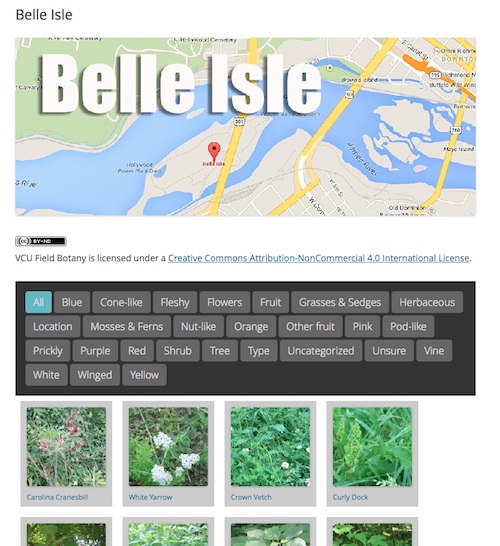
This site allows 20 students to record botanical findings, they do so by posting to their own blogs. The results are aggregated on to Field Botany | Plants of the James River Park System, There are already 700 posts.

Belle Isle

The students can post photos and informatino straight to their blogs with mobile phones while in the field.

Tom Woodward on who’s blog I discovered this site explains the details:

This early days for the site but in the end the intrepid biology duo of Jill Reid and Dianne Jennings will worked with their students to create a site that local residents can use to identify plants in our James River Park System.

Tom goes onto explain how he set the site up and the plugins used.

Glow Blogs

One of the problems with suggesting FeedWordPress for learning is that it requires a fair bit of work to get going, you cannot use it on WordPress.com, edublogs or other sites that host blogs for you, you need to set up your own hosting and add and configure the plugin. As we work our way through requirements and procurement of the new blogging solution for glow the possibility of being able to offer this sort of factuality is very exciting…

Using Galleries to Make Slideshows⤴

from

WordPress Galleries are a great way to tell visual stories with captioned pictures.  Galleries are just a simple way of inserting an attractive “gallery” of photos into a post, without having to worry about whether they line up correctly. It used to be, though, that you couldn’t see the Gallery in your post editor – just […]

WordPress just gets better: new version 3.9 features⤴

from

In case you hadn’t noticed, our  WordPress version has been upgraded to the shiny new V3.9. This isn’t just a “bug fix”; it offers some really nice, useful improvements, including: Improved visual editing Edit images easily Drag and drop your images Gallery previews Do more with audio and video Live widget and header previews Stunning […]

Easy Openbadging⤴

from @ The H-Blog

Last weekend, I took part in the Pedagoo event #tmlovelibraries. It was a fantastic day, and I learned loads. At the pub session afterwards, there was a sort of TeachMeet Unplugged event, similar in feel to the TeachMeet 365 events or, as Fearghal testified, to the very early TeachMeets themselves. Fearghal had asked us all to come with something we were prepared to share; as I have been doing a bit of work with OpenBadges and have been very impressed with them, I decided that this was what I was going to talk about.

Then I hit the problem. 2 minutes is not a very long time, particularly to talk about something you have been working on for months and have found out so much about. So, to keep things short, I decided to create an OpenBadge for all the participants of tmlovelibraries and then give it to them as a present. By claiming it, they could find out a bit about Openbadges themselves.

This idea seemed to work well in the keeping things short arena, as well as the engaging the audience area – the word ‘gift’ seemed to be the important one in achieving this! As Fearghal commented on the night, my talk also had the effect of taking his carefully honed structure and blasting it into a million pieces as people went scurrying to the internet to find their badge. The badge is shown below, together with its claim code for anyone who was there. To claim it, navigate to the badg.us site and insert the claim code ‘kapyua’ into the “Claim award from code” box. This will prompt you to either sign in to your Mozilla Backpack if you already have one, or sign up with an email address to create one before awarding you the tmlovelibraries – Participant badge, which you can then display on your blog, Facebook profile or Twitter feed.

In the impromptu break that followed my talk, I was talking to a few different people, and realised that there was a real appetite for finding out more about using OpenBadges. Quite a few people had looked at the concept themselves, before deciding that the project was too technical for them to use effectively. This, of course, is exactly the same decision I came to myself when I first started looking into digital badges. I had been impressed with the ease of creating badges for recognising various achievements on Edmodo, but had hoped for some way to display them in fronter, our school’s virtual learning environment. When I had approached the extremely helpful people at Edmodo asking if this was possible, they said that whilst they were happy for the badges to be displayed elsewhere, but it would need to be purely a case of copying them as an image and uploading them elsewhere.

I felt sure that there had to be a more efficient way of doing this, and went off doing a bit of digital badge research. It soon became clear that OpenBadges were exactly what I was looking for, but despite the fact that there were plentiful resources available for those with an ability to code, there was nothing I could find that was very user-friendly for a class teacher.

Until I chanced across the ForAllBadges site that is. Straight from the off, ForAllBadges allowed me to create an OpenBadge simply by uploading an image to the site and filling in the information fields to attach to it. Perfect for what I wanted. But ForAllBadges had far more to offer than I had been looking for. It gave me a whole badge-management system, allowing me to upload classes and add staff, create and issue badges and – most crucially given the age of my pupils – a way to display the badges earned without needing a Mozilla Backpack (currently, a Mozilla Backpack is only available to learners over the age of 13).

I soon had a pilot badge system up and running and a fronter page created with links to the pupil’s individual Trophy Rooms; here their badges could be seen through viewing their ForAllBadges badge journal. After an email exchange with the amazing people at ForAllBadges, the ability for the student to add a reflective comment to their badge journal was quickly added. This setup now allowed for a badge to be created, issued, displayed and reflected upon as well as having the advantage of being part of the OpenBadge system allowing a great degree of portability for the badges once the pupil reaches the age of 13 (or Mozilla update their terms & conditions to allow under 13s to have a Backpack with permission from their parent/carer – a change that is on the cards very soon I believe).

This was perfect for what I was looking to use it for in school, but perhaps a bit too complicated to use in ‘open play’. I had been thinking that OpenBadges could be a great way to document CPD activities such as TeachMeets or MOOCs for example, but how could an event organiser award a badge to someone whose details they didn’t know? Would they have to do all the data-inputting themselves? This sounded like a prohibitive amount of work.

Fortunately, a site that David Muir had pointed me towards had the answer. Badg.us allows a user to create badges very simply, and in much the same way as ForAllBadges. However, the badg.us site interfaces drectly with the Mozilla Backpack and Persona sign-in service, making it a far more user-friendly solution when you will be issuing badges to people from outwith your organisation or whose details you are unaware of in advance. It also lightens the administrative burden of issuing badges, as the onus is on the claimant to provide their details. The site allows you to set up reusable codes (like the one above) for large-scale issuing, or one-use codes when you are looking to target your badge claimants more precisely (I used this to create “Presenter” and “Organiser” badges for tmlovelibraries, printed up claim codes for these and gave them to Fearghal to distribute).

In my opinion, these tools make the whole process of creating and awarding badges far more accessible to the typical classroom practitioner; teachers who, much like myself and Fearghal, would previously have found the process too technical can use these services to gain the benefits of OpenBadges without having to become coding wizards. Other tools have been developed that can do a similar job – for instance, WPBadger and WPBadgeDisplay allow you to utilise WordPress blogs to issue and display badges whilst OpenBadges.me provides a very useful badge designer for either online use or as a WordPress plugin . Recently, the ForAllBadges site has joined together with its sister site ForAllRubrics, and you can set things up so that once a rubric has been com pleted, an OpenBadge can be awarded automatically. After some late-night Twitter conversations between myself and the founder of ForAllSystems, ForAllRubrics also has built-in links to the CfE Experiences & Outcomes. A very handy teacher toolkit!

So, now it begins to get exciting. The badges are no longer a concept. Now that a teacher – or a student? –  can create and award these badges, what might they do with them? I have a number of ideas that I’ll be trying in my school, and I know Fearghal had an inclination to use them as part of a programme he delivers at his school (this provoked a very interesting side discussion with David Gilmour about extrinsic/intrinsic motivation). I know that other organisations (including the Scout Association and – believe it or not – the SQA) have been looking at introducing them too.

What would you do with OpenBadges?

5 minute Post Challenge – Fonts on my WordPress Blog⤴

from @ The H-Blog

The Problem

I got a DM on Twitter from a friend of mine in the Western Isles. He had been reading some of my #itr12 posts, and wanted to draw my attention to something pretty fundamental – he could hardly read the text! He suggested that changing the font and its size might be a good idea.

That’s gotta be prety simple, right?

I said “No problem” and headed off to edit my posts. Interesting thing though, my WordPress blog was offering me very limited font choices, and no way of selecting font size. Hmmmm. What’s a chap to do?

The solution (not so simple, as it happens)

The solution involved a number of things. It involved installing the Editor FontSize, FontMeister, Space Invaders, Text Control and WP Editor plugins for my blog (not just them as it happens, I tried a few others on for size too!). Basically, these all provide some sort of formatting help, meaning I can now choose my font size, line spacing and certain other features too. But the fonts are best of all.

What’s so good about these fonts then?

With any website, it has to take a gamble as it will never know what fonts are installed on the computer that it is being displayed on. Sure, Times New Roman is likely to be available, but apart from that it’s a lottery. Obviously there are some fonts which there is more chance of a computer having than other fonts, but esentially it’s a gamble. Websites get round this by suggesting a font family, or a list of fonts to try and an order to try them in. From an accessibility point of view, this isn’t great, as you can never be sure what font your reader will be seeing.

But all that is changing. Web Fonts are OpenSource fonts which are available from the web – that means that they don’t have to be installed on a computer to be able to be displayed on that computer. Using FontMeister I added some Google Web Fonts as options to my blog, and am currently trying the Andika font to see how I get on with it. There is talk of the Open Dyslexic font being available as a web font soon too.

How’d the 5 minutes go?

Turned out to be nearer 15, but that’s still okay for a post I reckon!!!!!