Tag Archives: openbadges

Some more #openbadges thoughts⤴

from @ John's World Wide Wall Display

The previous post was an attempt to get the advanced Kanban open badge. This one follows up with an answer to the question posed in the P2PU Badges Project to my application and as wee thought about badge systems.

The feedback was questioning why I decided not to use the ‘Work in Progress’ system to limit the number of tasks in the doing section. I’ve already described the board I set up was to be used for Radio Edutalk. I’d had changed to do,doing and done for possible guests,shows and broadcasts.

I didn’t want to limit the doing(shows) section as that number will reflect the shows that are ready to go. A long list there is not a sign of doing too much but one of being prepared well in advance.

The feedback section in p2p is not that great. There is nowhere to enter answers to the question there. Hence this post and some blue sky thought. I wonder if a badge could send a trackback or something like it to a blog post, with feedback and /or a badge?

Maybe something trackback like (at least to my eyes) such as a Webmention (more:Webmention – IndieWebCamp).

So ideally (or in my imagination), the badge page has a URL. I write blog post in response giving evidence as to why I should get the badge. The badge pages gets pinged, creates my ‘project’ lets an approver/expert know. This person reviews the work and adds feedback to the project page and/or awards the badge. This action pings my blog post, adding the feedback/badge as a comment. Responding to the comment could answer feedback etc.

I am typing this pretty much from ignorance of the current badge scene perhaps this is already on some cards somewhere or already been rejected as a daft idea?

Thanks to Doug Belshaw who provide the opportunity to play with badges again.

Badges, Trello and Organisation⤴

from @ John's World Wide Wall Display

ShowsTrello

While I enjoy a geeky lifehack blog post as well as the next person I rarely take the advice. My inbox is pretty messy, I have no consistent way of organising files and I keep notes in text files in several different places (mostly dropbox), links in pinboard.in and that is about it. No GTD here I am afraid.

I have been watching the technical guys at work use kanban boards on the wall for a while now so was interested in Doug’s recent posts on Trello 1. Combined with a rainy day and the opportunity to just run through an open badges experience I though I’d give it a go.

Trello

Trello is certainly easy to set up. I though I’d have a we shot at organising Edutalk episodes. We had been doing this with Google Sheets, but that seemed to be getting a bit complex.

Trello is a free web-based project management application originally made by Fog Creek Software in 2011, that spun out to be its own company in 2014 2

It basically lets you organise lists of cards and move them from one board to another. For the 101 badge Doug suggested Create a new board with (at least) three lists: To do, Doing, and Done.

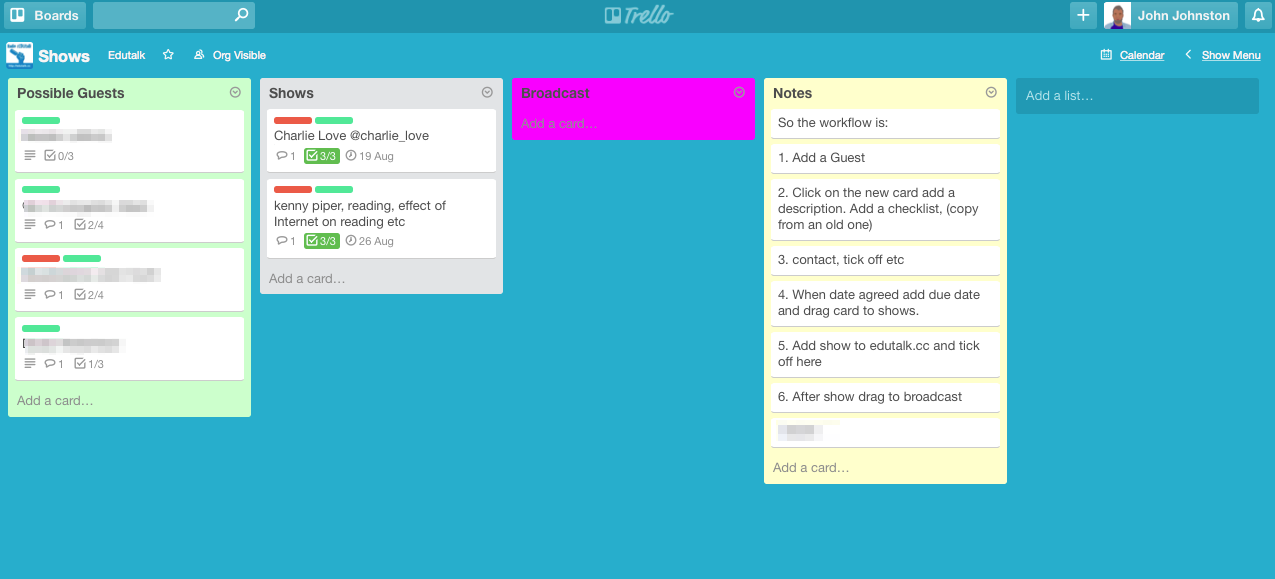
I changed this to Possible Guests, Shows, Broadcast.

The card have names of the guests, notes, a check list (contact, agreed, set date etc). labels etc. When the date is agreed I set a due date and drag card to the Show Column. The fact it has a due date adds it to a calendar and I subscribe to that with my mac/phone calendar app.

Badges

This got me the Kanban 101 badge, thanks Doug. That let me work through the P2PU badges process, which is pretty straightforward.

  1. You go to the Kanban 101 badge page.
  2. Click submit a project for this badge and away you go. (you do need an account for P2PU but I seem to have picked one of those up before)
  3. Claiming the badge only requires a screenshot and a few lines of text.
  4. Once you submit you get an email and then another one when your submission is approved. Visiting the page allows you to add this to your mozilla backpack (I got one of those a while back)

This process feels pretty smooth, the only problem I came across was sending the badge to my backpack. I had a problem doing that until i went and signed on to backpack before submitting as opposed to as I went along.

Another Badge?

Doug has also made an Advanced Kanban Badge so I though I’d give that a go too.

The Criteria:

  1. Add a ‘Work In Progress’ (WIP) limit to the ‘Doing’ list
  2. Define and use labels effectively
  3. Add attachments and due dates to cards
  4. Collaborate with others

My Effort:

  1. I didn’t add a WIP limit to my doing (shows list) as it does not need one.
  2. I had already added labels, for Wednesday/Tuesday the days we do shows and red one for ‘Agreed’ to indicate if guests have agreed to be on a show.
  3. Due dates are added when a card become a show to produce the calendar as describe above. I’ve tested out attachments and that might be useful going forward, it is pretty easy.
  4. I’ve invited my partner in EDUtalk to the board.

Given I’ve not exactly met the criteria I though I might try something else to see if that would get me a badge.

I’ve made a few customisations to the board, adding an icon and changing the background colour so I though I might change the background of the lists. There are no preferences for that.

I use an extension for Safari that allows you to test out CSS which got me what I wanted. I then need to use these styles when the board loads. I searched Safari extensions but didn’t find what I needed, but I did notice I had an unactivated extension stylish so activated that.3

Here is the styles I am using:


.list:nth-child(1) {
    background: #ccffcc;
}
.list:nth-child(2) {
    background: #ffcccc;
}
.list:nth-child(3) {
    background: #ff00ff;
}
.list:nth-child(4) {
    background: #ffffcc;
}
body{
 zoom:90%
}

The final style just zooms the page out a wee bit letting me see the whole board on my macbook. It looks like there a pile of styles available for Trello at userstyles.org these might be better than mine;-)

This gives me the screenshot at the start of this post. The final advice on the Advance kanban badge is:

Evidence may be provided via a screencast, a series of screenshots, and/or a blog post.

Hopefully this will do it.

I wonder if this will make any difference to my organisation, I am hoping it may given kanban/trello seems to be an extremely simple system and the trello site is quite usable without recourse to any help.

Open Education, Open Scotland – report & presentations⤴

from @ Open World

(Originally posted at Open Scotland)

Last week the ALT Scotland Special Interest Group hosted the second Open Scotland event, Open Education, Open Scotland at the Informatics Forum at the University of Edinburgh.  This free and open event was attended by sixty colleagues, and speakers represented every sector of Scottish education including schools, further education, higher education and government.

A recording of the event livestream, courtesy of Martin Hawksey of ALT, is available here: morning livestream, afternoon livestream, and there is a storify of tweets, links and presentations here: Open Education, Open Scotland Storify.

 Open Education, Open Scotland  – Joe Wilson, Scottish Qualifications Authority

The event was opened and introduced by Joe Wilson of the Scottish Qualifications Authority and the ALT Scotland SIG.  Joe suggested that universities in Scotland are currently in a very privileged position, but warned that the relationship between learners and institutions is changing.  Meanwhile the college sector has been comprehensively restructured but there is a danger of loosing the focus on the learner in the midst of restructuring.  Joe asked where are the attempts to look at new models of assessment?  Employers want to see that rich portfolio of experience that differentiates students as individuals.  He also asked, what can we do to encourage community learning and digital participation? A  citizen without a browser is now at a disadvantage as Government moves online by default.  Joe challenged delegates to think out of the box in terms of resources, assessment, and credentials and asked how can we open up access to resources to empower disadvantaged learners?

Open Scotland, Open ALT – Maren Deepwell, ALT

Maren provided an update on ALT’s collaboration, strategy and partnerships.  With a slide of Glasgow School of Art’s now destroyed Mackintosh Library, Maren gave us a timely reminder that not all we care about is digital, people are at the heart of what ALT do.  Maren also flagged up some good examples of sharing and open practice including ALT’s ocTEL online course and the Scottish Open Education Declaration from Cetis and Open Scotland.

Scottish Government Perspectives – Colin Cook, Deputy Director of Digital Strategy, Scottish Government

Colin introduced the Scottish Government’s Digital Strategy and focused on the role of the Digital Directorate to bring coherence to digital and ICT initiatives.  The Scottish Government has a policy commitment to build a world class digital Scotland and recognises that digital participation offers an opportunity to challenge ingrained inequalities. The Government wants to provide opportunities for people to move up the digital skills pathway, but it’s important to focus on learning, not just assistance. Third sector organisations have a huge role to play due to the position of trust they have with the digitally excluded.

The government is committed to driving forward digital transformation across the public sector and recognises the need for industry partnerships with education to develop a digital skills academy.  Colin acknowledged that wider use of data is critical to the Government’s long term vision of delivering effective public services, but added that safeguards are in place to promote public confidence so that people can be comfortable with how data is being shared.

SFC and OU update –  David Beards, SFC and Ronald MacIntyre, OU

Learning technology is high on the funding council agenda at the moment.  MOOCs currently dominate the policy rhetoric, but this is well understood and the importance of pedagogy is always there in the background.  Jisc is still the biggest thing that SFC funds and they are committed to the open agenda so it is up to everyone in the sector to let Jisc know what we want them to do.

SFC is providing the Open University with £1.27 million over three years to raise awareness of open education practice and support the sector’s capacity for online pedagogy.  The new “Open Project” will develop an online hub to share best practice, produce a small number of high quality OERs of particular benefit to Scotland, and evaluate various economic models for openness.  The outputs of the project will be very much in accordance with the activities undertaken by Open Scotland over the last year.

Open Badges, Open Borders – Suzanne Scott,  Borders College

Suzanne presented Borders College’s innovative use of open badges. Borders College’s journey started with a Moodle open badges pilot but following a chance discussion with the head of human resources, the initiative has now spread. Open badges are now used to engage with staff and have replaced all staff CPD paper certificates.  The use of badges for staff has increased loyalty and attendance at CPD sessions.

Phonar Open Courses – Jonathan Worth, Coventry University

Jonathan related his experiences of rethinking the business model behind photography and opening access to his Coventry University photography course.  The course, Phonar,  expanded from 9,000 to 35,000 people over a thirteen-week period prompting a mixed response from the university.   Institutions hear “open” and they think “free”, but talk about “connected” and they see business opportunities. Connections mean networks and opportunities.  Photographs are not the product, but digital fluency is an extremely valuable product.  Jonathan also warned “If you think your product as a teacher is information, you’re going head to head with the internet. Good luck with that!”  Jonathan also introduced Phonar Nation, “The biggest youth photography class in the world”.

Exploring the Digital University – Sheila MacNeill, Glasgow Caledonian University

After our scheduled speaker was unfortunately unable to attend,  Sheila kindly agreed to step in at the last minute to talk about research she and Bill Johnson have been undertaking on exploring the digital university. Sheila presented four key themes for digital universities: digital participation, information literacy, learning environments,  and curriculum and course design. She noted that universities’ civic roles can change quite profoundly through digital technology and urged us to think about the interface of digital and physical interaction.  Sheila also referred to Edinburgh Napier University’s Digital Futures project and talked about mapping digital literacy and residency across different university services.  Wrapping up her presentation Sheila questioned whether being an open practitioner was a “luxury” or a “daily necessity” for colleagues across the sector. 

Opening GLOW – Opening GLOW – Ian Stuart and John Johnston

GLOW initially started life as a national schools intranet in 2001, now Glow is about unlocking the benefits of the internet and providing learning opportunities.  For some time GLOW seemed clunky and unworkable but in 2010 wikis and forums were added.  Identity management should be core to GLOW services and accommodating BYOD has to be part of the GLOW landscape.  John and Ian acknowledge that there’s still lots of work to do with GLOW, but also plenty room to manoeuvre and to encourage teachers to become open educators. We need to encourage teachers to open up in as many ways as possible, the technology is the easy bit, culture is harder, and we need help from folk further along the road.

The Scottish Open Education Declaration – Lorna M. Campbell, Cetis

Lorna introduced the Scottish Open Education Declaration a community initiative launched by Cetis and Open Scotland. Based on the UNESCO Paris OER Declaration, the Scottish Open Education Declaration has a wider scope as it focuses on all aspects of open education practice, not just open education resources. The declaration also includes a clause on supporting the use of open source software in education. A key aspect of the declaration is the focus on education as a public good. The declaration is an open CC licensed public draft and all colleagues are invited to contribute.  A large number of comments have already been received, points that have been raised include, changing the focus of the declaration so that technology is viewed as an enabler rather than a driver, the need for an open culture shift and the necessity of capacity building, the importance of sharing and education sectors and stronger commitments to open licensing.  The first draft will remain open for comment for another month, then comments will be edited into the document, and a second draft posted for further discussion.


Open Education, Open Scotland Event⤴

from @ Open World

The Association for Learning Technology (ALT) Scotland Special Interest Group (SIG), in collaboration with Jisc RSC Scotland, SQA and Cetis will host Open Education, Open Scotland at the Informatics Forum at the University of Edinburgh on Tuesday, 3rd June 2014.

This free one-day event will provide an opportunity for ALT Scotland SIG members and the wider community to come together and share ideas and experiences of adopting and promoting open educational practices across all sectors of Scottish education.

“Open education can promote knowledge transfer while at the same time enhancing quality and sustainability, supporting social inclusion, and creating a culture of inter-institutional collaboration and sharing. In addition, open education can expand access to education, widen participation, create new opportunities for the next generation of teachers and learners and prepare them to become fully engaged digital citizens.”

- Scottish Open Education Declaration

Early last year, these four supporting institutions launched Open Scotland, a voluntary, cross-sector initiative that aims to raise awareness of open education, encourage the sharing of open educational resources, and promote the development of open policy and practice. A number of awareness raising activities have taken place including:

  • The Open Scotland Summit, which brought together senior managers, policy makers and key thinkers to explore the development of open education policy and practice in Scotland.
  • The Open Scotland blog was launched to disseminate news relating to all aspects of openness in education and to act as a focal point for discussion and debate.
  • The first draft of the Scottish Open Education Declaration was released. This open draft is based on the UNESCO Paris OER Declaration, but extends its scope to focus on open education in general, rather than OER in particular.

Invited Speakers and Topics:

  • Maren Deepwell, ALT: Update from ALT
  • Colin Cook, Scottish Government: Scottish Government perspectives
  • David Beards, SFC: SFC Update
  • Ronald MacIntyre, Open University: OU Scotland’s Open Education Project
  • Suzanne Scott, Borders College: Open Badges, Open Borders
  • Jonathan Worth, Coventry University: Open Courses
  • Natalie Lafferty, University of Dundee: Students as consumers and producers of open educational resources
  • Ian Stewart and John Johnstone, GLOW
  • Lorna M Campbell, Cetis: Scottish Open Education Declaration

There are still a few places available for this free event.  Registration and further information is available here: https://www.alt.ac.uk/civicrm/event/info?reset=1&id=106


Easy Openbadging⤴

from @ The H-Blog

Last weekend, I took part in the Pedagoo event #tmlovelibraries. It was a fantastic day, and I learned loads. At the pub session afterwards, there was a sort of TeachMeet Unplugged event, similar in feel to the TeachMeet 365 events or, as Fearghal testified, to the very early TeachMeets themselves. Fearghal had asked us all to come with something we were prepared to share; as I have been doing a bit of work with OpenBadges and have been very impressed with them, I decided that this was what I was going to talk about.

Then I hit the problem. 2 minutes is not a very long time, particularly to talk about something you have been working on for months and have found out so much about. So, to keep things short, I decided to create an OpenBadge for all the participants of tmlovelibraries and then give it to them as a present. By claiming it, they could find out a bit about Openbadges themselves.

This idea seemed to work well in the keeping things short arena, as well as the engaging the audience area – the word ‘gift’ seemed to be the important one in achieving this! As Fearghal commented on the night, my talk also had the effect of taking his carefully honed structure and blasting it into a million pieces as people went scurrying to the internet to find their badge. The badge is shown below, together with its claim code for anyone who was there. To claim it, navigate to the badg.us site and insert the claim code ‘kapyua’ into the “Claim award from code” box. This will prompt you to either sign in to your Mozilla Backpack if you already have one, or sign up with an email address to create one before awarding you the tmlovelibraries – Participant badge, which you can then display on your blog, Facebook profile or Twitter feed.

In the impromptu break that followed my talk, I was talking to a few different people, and realised that there was a real appetite for finding out more about using OpenBadges. Quite a few people had looked at the concept themselves, before deciding that the project was too technical for them to use effectively. This, of course, is exactly the same decision I came to myself when I first started looking into digital badges. I had been impressed with the ease of creating badges for recognising various achievements on Edmodo, but had hoped for some way to display them in fronter, our school’s virtual learning environment. When I had approached the extremely helpful people at Edmodo asking if this was possible, they said that whilst they were happy for the badges to be displayed elsewhere, but it would need to be purely a case of copying them as an image and uploading them elsewhere.

I felt sure that there had to be a more efficient way of doing this, and went off doing a bit of digital badge research. It soon became clear that OpenBadges were exactly what I was looking for, but despite the fact that there were plentiful resources available for those with an ability to code, there was nothing I could find that was very user-friendly for a class teacher.

Until I chanced across the ForAllBadges site that is. Straight from the off, ForAllBadges allowed me to create an OpenBadge simply by uploading an image to the site and filling in the information fields to attach to it. Perfect for what I wanted. But ForAllBadges had far more to offer than I had been looking for. It gave me a whole badge-management system, allowing me to upload classes and add staff, create and issue badges and – most crucially given the age of my pupils – a way to display the badges earned without needing a Mozilla Backpack (currently, a Mozilla Backpack is only available to learners over the age of 13).

I soon had a pilot badge system up and running and a fronter page created with links to the pupil’s individual Trophy Rooms; here their badges could be seen through viewing their ForAllBadges badge journal. After an email exchange with the amazing people at ForAllBadges, the ability for the student to add a reflective comment to their badge journal was quickly added. This setup now allowed for a badge to be created, issued, displayed and reflected upon as well as having the advantage of being part of the OpenBadge system allowing a great degree of portability for the badges once the pupil reaches the age of 13 (or Mozilla update their terms & conditions to allow under 13s to have a Backpack with permission from their parent/carer – a change that is on the cards very soon I believe).

This was perfect for what I was looking to use it for in school, but perhaps a bit too complicated to use in ‘open play’. I had been thinking that OpenBadges could be a great way to document CPD activities such as TeachMeets or MOOCs for example, but how could an event organiser award a badge to someone whose details they didn’t know? Would they have to do all the data-inputting themselves? This sounded like a prohibitive amount of work.

Fortunately, a site that David Muir had pointed me towards had the answer. Badg.us allows a user to create badges very simply, and in much the same way as ForAllBadges. However, the badg.us site interfaces drectly with the Mozilla Backpack and Persona sign-in service, making it a far more user-friendly solution when you will be issuing badges to people from outwith your organisation or whose details you are unaware of in advance. It also lightens the administrative burden of issuing badges, as the onus is on the claimant to provide their details. The site allows you to set up reusable codes (like the one above) for large-scale issuing, or one-use codes when you are looking to target your badge claimants more precisely (I used this to create “Presenter” and “Organiser” badges for tmlovelibraries, printed up claim codes for these and gave them to Fearghal to distribute).

In my opinion, these tools make the whole process of creating and awarding badges far more accessible to the typical classroom practitioner; teachers who, much like myself and Fearghal, would previously have found the process too technical can use these services to gain the benefits of OpenBadges without having to become coding wizards. Other tools have been developed that can do a similar job – for instance, WPBadger and WPBadgeDisplay allow you to utilise WordPress blogs to issue and display badges whilst OpenBadges.me provides a very useful badge designer for either online use or as a WordPress plugin . Recently, the ForAllBadges site has joined together with its sister site ForAllRubrics, and you can set things up so that once a rubric has been com pleted, an OpenBadge can be awarded automatically. After some late-night Twitter conversations between myself and the founder of ForAllSystems, ForAllRubrics also has built-in links to the CfE Experiences & Outcomes. A very handy teacher toolkit!

So, now it begins to get exciting. The badges are no longer a concept. Now that a teacher – or a student? –  can create and award these badges, what might they do with them? I have a number of ideas that I’ll be trying in my school, and I know Fearghal had an inclination to use them as part of a programme he delivers at his school (this provoked a very interesting side discussion with David Gilmour about extrinsic/intrinsic motivation). I know that other organisations (including the Scout Association and – believe it or not – the SQA) have been looking at introducing them too.

What would you do with OpenBadges?